Climb no more than 15 m — and put the mast 105 m south of the container
A 10 m grid across the whole parcel found 780 spots; 228 have a tree canopy of at least 15 m. At the 15 m limit, the best combination of signal, tree height and cable distance is N105: a 22 m tree 105 m south of the container, with a clear-enough Deloraine path for ~94 Mbps Optus n8 and ~42 Mbps Telstra B28. The strongest signal is SE220, 221 m south-east, at −67 dBm / 75 Mbps on Telstra Sassafras. The simplest is N50, 50 m from the container, with Cat6 PoE and no fiber.
N105 Primary
| Tree / climb | 22 m / 15 m |
| Distance | 105 m |
| Deloraine Telstra | 42 Mbps |
| Deloraine Optus | 94 Mbps |
| Sassafras Telstra | — |
Best speed; 105 m fiber
SE220 Strongest
| Tree / climb | 23 m / 15 m |
| Distance | 221 m |
| Deloraine Telstra | 24 Mbps |
| Deloraine Optus | 77 Mbps |
| Sassafras Telstra | 75 Mbps @ -67 dBm |
Strongest RSSI; 221 m fiber
N117 Alternative
| Tree / climb | 21 m / 15 m |
| Distance | 118 m |
| Deloraine Telstra | 34 Mbps |
| Deloraine Optus | 92 Mbps |
| Sassafras Telstra | 4 Mbps @ -99 dBm |
Excellent; 118 m fiber
What to build
- Primary: N105 (−41.373478, 146.378171). 15 m mast in a 22 m tree. Aim 124.4° true at Deloraine 7304001. Fiber 105 m to the container; local WAVLINK AP at the container.
- Strongest: SE220 (−41.374377, 146.379847). 15 m mast in a 23 m tree. Aim 63.4° true at Telstra Sassafras 7307001. Fiber 221 m; local AP.
- Simplest: N50 (−41.372580, 146.378052). 15 m mast in a 17 m tree. Aim 124.6° true at Deloraine. Cat6 PoE 50 m; local AP.
- WiFi: mount the WAVLINK AP outside the container; 2.4 GHz for range, 5 GHz for local devices; 30–50 m coverage around the container.
- Test all three at 15 m before choosing; the model is a desk study.
Why not the container?
The container clearing has no 15 m tree — the canopy at the container is 0 m, and the nearest 15 m+ trees are 50–105 m away. A 15 m mast at the container would be a pole, not a tree climb. The v3 container result (15 m, 25/50 Mbps) remains valid for a pole, but the whole-parcel scan finds much better tree spots.
SE225 (225 m SE) gives 75 Mbps on Sassafras but the exact point has a 1 m canopy — no 15 m tree. It is a pole-only option; the nearest 15 m+ tree at the edge is SE203/SE220.
The honest range
These are central model values with LIST LiDAR canopy and the v3 diffraction scenario. The pessimistic case is still materially lower; the field test is the only way to confirm. Do not sign a 24-month plan before testing N105 and SE220 at 15 m.
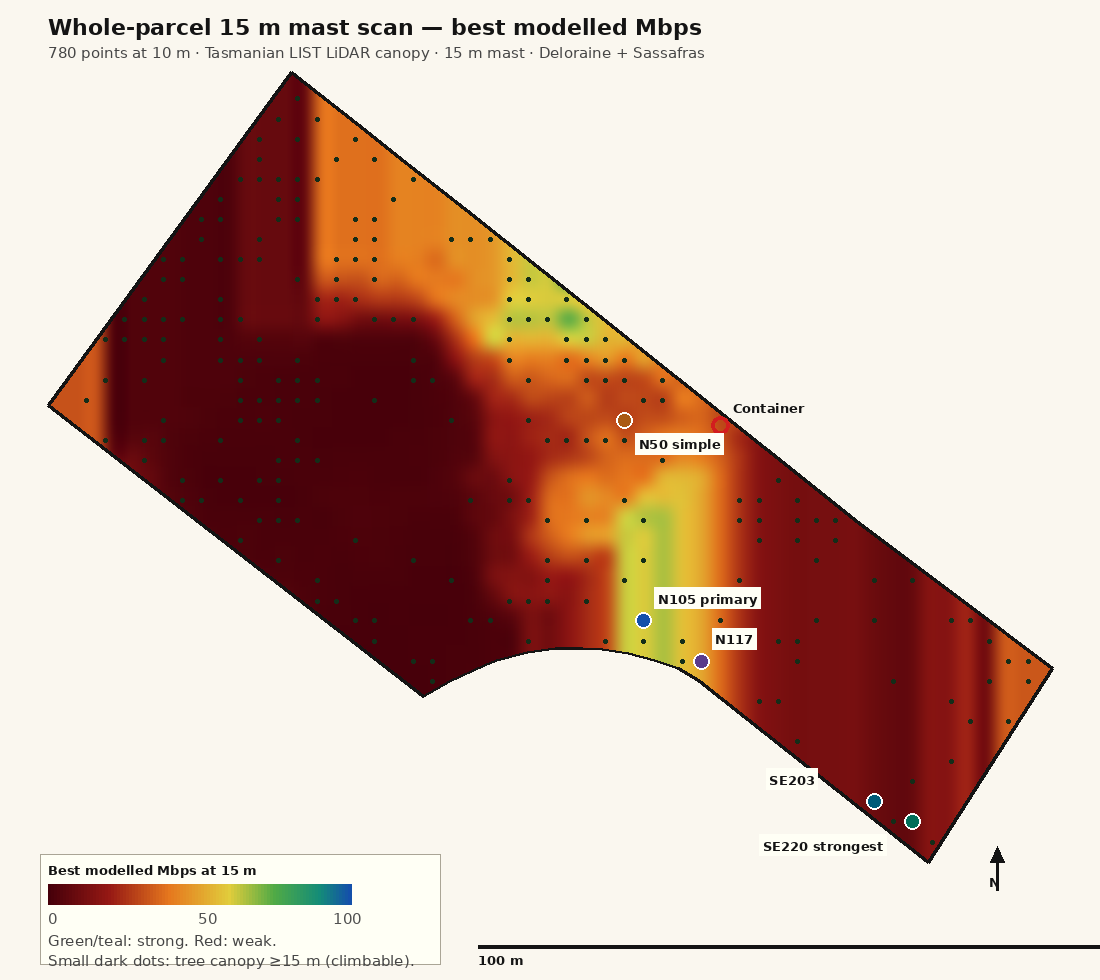
780 spots at 10 m — the hot zones are south and south-east, not at the container
We scanned every 10 m point inside the 8.26 ha parcel at a fixed 15 m mast and computed the Deloraine (124°) and Sassafras (63°) paths with the LIST LiDAR canopy. The heatmap shows the best modelled Mbps of any carrier at each point. Dark dots are points with a tree canopy ≥15 m — the only points where a 15 m tree climb is possible. The best signal is concentrated in a band 50–230 m south/south-east of the container, where the path clears the worst of the ridge canopy.
What the scan found
| Metric | Value |
|---|---|
| Grid points inside parcel | 780 at 10 m |
| Points with tree canopy ≥15 m | 228 |
| Points with no 15 m tree | 552 |
| Best tree spot, Deloraine | N105 — 94 Mbps Optus / 42 Telstra |
| Best tree spot, Sassafras | SE220 — 75 Mbps @ −67 dBm |
| Shortest good tree spot | N50 — 50 m, Cat6 PoE |
| Tree height range at top spots | 17–23 m |
The heatmap uses the central link model. The tree dots are exact LIST LiDAR samples at each grid point; the 10 m grid is the limit of resolution. A dot does not guarantee a climbable tree — check species, lean, dead wood and root plate on site.
The trade-off
Signal improves as you move south/south-east, away from the container, because the path to Deloraine/Sassafras shifts off the worst canopy. But cable distance grows: N105 is 105 m; SE220 is 221 m; the far west spots are 289–313 m. The best signal-per-metre is N105, not the absolute strongest SE220.
The container itself has no 15 m tree. If you want the mast at the container, it must be a 15 m pole, not a tree climb; the v3 pole result is 25/50 Mbps at 15 m. The whole-parcel tree spots are better.
Esri World Imagery. Markers: N105 (primary), SE220 (strongest), N50 (simple), N117, SE203 and the container. The parcel boundary is yellow. Hover/click for tree height and modelled speed. The static heatmap above is the full 780-point scan; this map is for orientation.
The top 12 tree spots, ranked by signal and practicality
All values are at a 15 m mast with exact LIST LiDAR canopy along the top candidates’ paths. “Tree” is the LiDAR canopy height at the point; a 15 m climb fits when the tree is ≥15 m. Deloraine values are Mbps at 15 m; Sassafras is Telstra 7307001. “No tree” means the point is a clearing/pole-only option.
| Spot | Tree / climb | Distance | Deloraine Telstra | Deloraine Optus | Sassafras Telstra | Use |
|---|---|---|---|---|---|---|
| N105 Primary |
22 m climb 15 m | 105.0 m | 42.5 | 94.2 | — | Primary Best speed; 105 m fiber |
| SE220 Strongest |
23 m climb 15 m | 220.9 m | 23.5 | 77.2 | 75.0 @ -67.2 | Strongest Strongest RSSI; 221 m fiber |
| N117 Alternative |
21 m climb 15 m | 117.5 m | 33.6 | 92.0 | 4.3 @ -99.1 | Alternative Excellent; 118 m fiber |
| N114 Alternative |
18 m climb 15 m | 114.3 m | 35.9 | 83.6 | — | Alternative Good; 114 m fiber |
| SE203 Sassafras |
21 m climb 15 m | 203.4 m | 13.0 | 36.7 | 75.0 @ -76.6 | Sassafras Sassafras; 203 m fiber |
| SE205 Sassafras |
23 m climb 15 m | 205.6 m | 13.5 | 37.8 | 75.0 @ -79.4 | Sassafras Sassafras; 206 m fiber |
| SE234 Sassafras |
18 m climb 15 m | 234.4 m | 12.1 | 34.6 | 75.0 @ -67.2 | Sassafras Sassafras; 234 m fiber |
| N50 Simple |
17 m climb 15 m | 50.0 m | 14.4 | 43.6 | 1.2 @ -105.4 | Simple No fiber; 50 m Cat6 PoE |
| N140 Middle |
20 m climb 15 m | 140.3 m | 13.1 | 37.1 | 7.1 @ -96.7 | Middle Middle; 140 m fiber |
| NW288 Long fiber |
15 m climb 15 m | 288.6 m | 21.7 | 62.7 | 8.6 @ -95.7 | Long fiber Tree exactly 15 m; 289 m fiber |
| W312 Long fiber |
23 m climb 15 m | 312.6 m | 30.1 | 58.4 | — | Long fiber Fiber; 313 m |
| SE225 No tree |
1 m no 15 m tree | 225.6 m | 15.9 | 43.3 | 75.0 @ -67.2 | No tree Best signal but no 15 m tree |
Mbps values are central-model downlink estimates, not speed tests. Deloraine Telstra = B28 700 MHz 20 MHz; Deloraine Optus = n8 900 MHz 25 MHz; Sassafras Telstra = B28 700 MHz 20 MHz at 12.5 km. “@” is RSRP dBm. The 15 m limit is fixed; no spot exceeds it.
Reading the table
N105 is the best speed at the shortest fiber distance. SE220 is the strongest signal and the most robust against canopy/weather, but the fiber is 221 m. N117 is a close second to N105 (92 Mbps, 118 m) with a 21 m tree. N50 is the no-fiber option: 50 m Cat6 PoE, 44 Mbps Optus, 14 Mbps Telstra. SE225 has the best signal of all but no 15 m tree — pole only.
105 m south of the container: a 22 m tree, a 15 m mast, ~94 Mbps Optus
N105 is the best signal-per-metre in the parcel. It sits 105 m south of the container at −41.373478, 146.378171. The tree is 22 m, so a 15 m mast has 7 m of headroom. The Deloraine path crosses only ~100 m of canopy at 15 m; the modelled central result is ~94 Mbps on Optus n8 and ~42 Mbps on Telstra B28. It is the primary recommendation because the fiber run is only 105 m.
N105 at a glance
| Coordinates | −41.373478, 146.378171 |
| Tree height / climb | 22 m / 15 m |
| Distance to container | 105 m |
| Aim | 124.4° true · Deloraine 7304001 · 27.39 km |
| Canopy path at 15 m | ~100 m |
| Optus n8 900 MHz | −79.2 dBm · 94.2 Mbps |
| Telstra B28 700 MHz | −85.9 dBm · 42.5 Mbps |
| Backhaul | 105 m fiber (or Cat6 + PoE extender) |
| WiFi | WAVLINK AP at container |
RSRP is the central model; SINR 10.8 dB Optus / 5.1 dB Telstra. The local tree crown adds ~3 dB, already included in the central case; the profile visual excludes the first 25 m so the ridge is visible.
Why N105 wins
- Speed: 94 Mbps Optus n8 is the highest practical tree-spot result at a reasonable distance; Telstra B28 gives 42 Mbps as a robust fallback.
- Distance: 105 m is short enough for direct-buried fiber or a Cat6 + PoE extender; no local solar/battery is required if you run 48 V DC.
- Tree: 22 m canopy, 7 m headroom over the 15 m mast; healthy eucalypt selection is realistic.
- WiFi: the AP stays at the container; the mast does not need to radiate WiFi back to the container.
N105 path profile — 15 m mast
The ray clears the worst ridge canopy; the remaining ~100 m of foliage is early-path forest. The red bar is the part of the ray inside canopy. The profile visual excludes the first 25 m at the mast (the mast is inside the tree crown; local crown loss is 3 dB in the link budget, not a ridge).
221 m south-east: a 23 m tree, clear line to Sassafras, −67 dBm
SE220 is the strongest signal in the parcel. At −41.374377, 146.379847, the 23 m tree and 15 m mast see a clear path to Telstra Sassafras 7307001 (12.54 km, 63.4°). The modelled 75 Mbps at −67 dBm is the best RSRP of any tree spot. The trade-off is a 221 m fiber run to the container. It is the right choice if robustness matters more than cable cost.
SE220 at a glance
| Coordinates | −41.374377, 146.379847 |
| Tree height / climb | 23 m / 15 m |
| Distance to container | 221 m |
| Aim | 63.4° true · Telstra Sassafras 7307001 · 12.54 km |
| Sassafras path at 15 m | 0 m canopy (clear) |
| Telstra Sassafras 700 MHz | −67.2 dBm · 75 Mbps |
| Deloraine Optus fallback | −81.5 dBm · 77.2 Mbps |
| Backhaul | 221 m fiber |
| WiFi | WAVLINK AP at container |
The −67 dBm result is the strongest in the scan. The Sassafras 700 MHz channel is 20 MHz; 75 Mbps is the model cap, not a guarantee. Telstra Sassafras is an omni 40 m tower with 57.7 dBm EIRP; the clear path is what makes it work.
Why SE220
- Strongest RSRP: −67 dBm gives 24 dB SINR and the best rain/canopy margin.
- Clear 63° path: the SE clearing opens the Sassafras line; the ray is above the near ridge.
- Fallback: Deloraine Optus also gives 77 Mbps at −81.5 dBm, so the spot is not single-tower dependent.
- Cost: 221 m fiber is the main penalty; local AP at the container still gives good WiFi.
SE220 path profile — 15 m mast
The clean Sassafras path is why SE220 wins on RSRP. The first 25 m at the mast is excluded from the visual (the mast is inside the tree crown); the local crown is included as 3 dB in the link budget.
50 m from the container: a 17 m tree, Cat6 PoE, no fiber
N50 is the practical low-cost option. At −41.372580, 146.378052, a 17 m tree gives 2 m of headroom for a 15 m mast. The Deloraine path is weaker than N105 — ~44 Mbps Optus / ~14 Mbps Telstra — but the container is only 50 m away, so Cat6 PoE works without fiber, media converters or a remote power supply. It is the simplest install and still gives a usable link.
N50 at a glance
| Coordinates | −41.372580, 146.378052 |
| Tree height / climb | 17 m / 15 m |
| Distance to container | 50 m |
| Aim | 124.6° true · Deloraine 7304001 · 27.46 km |
| Canopy path at 15 m | ~500 m Telstra / ~450 m Optus |
| Optus n8 900 MHz | −86.5 dBm · 43.6 Mbps |
| Telstra B28 700 MHz | −93.0 dBm · 14.4 Mbps |
| Backhaul | 50 m Cat6 PoE |
| WiFi | WAVLINK AP at container |
N50 is the easiest build but the weakest of the three. Use it if fiber is a deal-breaker; otherwise N105 is worth the 105 m fiber for ~2× the speed.
Why N50
- No fiber: 50 m Cat6 PoE from the container switch; active 802.3at.
- Tree: 17 m canopy; 2 m headroom over 15 m — check the top and the lean carefully.
- Speed: 44 Mbps Optus / 14 Mbps Telstra; enough for streaming and general use, not for heavy upload.
- WiFi: local AP at container; the short cable keeps the install simple.
N50 path profile — 15 m mast
N50 still crosses ~500 m of canopy at 15 m, which is why its Deloraine result is lower than N105. The 50 m cable is the compensation.
Keep the WiFi AP at the container — the mast is only the backhaul
The best signal spots are 105–221 m from the container. Putting the WiFi AP at the mast would send WiFi through trees and the metal container wall; instead, keep the WAVLINK AX3000 AP at the container and run a fiber or Cat6 backhaul from the mast. That gives strong WiFi around the container regardless of which RF spot you choose.
Container WiFi coverage
- AP: WAVLINK AX3000 outdoor AP, 4 × 8 dBi omni, IP67, 802.3af/at, 1 GbE.
- 2.4 GHz: ~30–50 m around the container; best for the Reolink camera and phones.
- 5 GHz: ~20–30 m; best for laptops/TV inside or immediately outside.
- Mount: outside, under the eave, 2.5–3 m high, antennas vertical; avoid the metal wall shadow.
- Channels: 2.4 GHz 1/6/11; 5 GHz 36/40/44/48; WPA3/WPA2, WPS off.
- Power: 802.3at from the container switch; ~15 W typical, 30 W class.
What the mast carries
- ATL 5G CPE at 15 m, aimed at Deloraine (N105/N50) or Sassafras (SE220).
- Ethernet/fiber back to the container; no WiFi radiated from the mast.
- PoE injector at the mast for the ATL (802.3af/at, 10 W) or 48 V DC direct.
- Surge protection at both ends; fiber is non-conductive and avoids a copper lightning path.
- Local AP at the container handles all client WiFi and the camera.
Backhaul options by spot
| Spot | Distance | Recommended backhaul | Power at mast | WiFi |
|---|---|---|---|---|
| N105 (primary) | 105 m | 2-core single-mode fiber + media converters (or Cat6 + PoE extender) | 48 V DC over 2.5–4 mm², or local 12 V battery/solar | WAVLINK AP at container |
| SE220 (strongest) | 221 m | Fiber + media converters | 48 V DC over 4 mm², or local 12 V battery/solar | WAVLINK AP at container |
| N50 (simple) | 50 m | Cat6 PoE (802.3at) | PoE from container switch | WAVLINK AP at container |
| N117 (alternative) | 118 m | Fiber or Cat6 + PoE extender | 48 V DC / local | WAVLINK AP at container |
| SE203 | 203 m | Fiber | 48 V DC / local | WAVLINK AP at container |
Cat6 PoE is limited to ~100 m including the vertical run; at 105–118 m use a PoE extender or fiber. At 203–221 m use fiber. 48 V DC over 4 mm² has low drop at the ATL’s 10 W; fuse and surge both ends. Fiber is preferred for lightning isolation.
Why not WiFi from the mast?
A 15 m mast 105–221 m from the container would need to push 2.4/5 GHz through 15–30 m forest and a metal container wall. The link would be weak and asymmetric. The local AP at the container is the correct design; the mast is a pure 4G/5G backhaul.
Fiber for the far spots, Cat6 PoE for the near one
The design is deliberately split: the ATL at the mast, a backhaul to the container, the WAVLINK AP at the container, and the main 12 V system at the container. The camera remains on its own 6 W panel; the AP and switch are on the main battery.
| Item | N105 (primary) | SE220 (strongest) | N50 (simple) |
|---|---|---|---|
| Distance | 105 m | 221 m | 50 m |
| Backhaul | 2-core SM fiber + media converters | 2-core SM fiber + media converters | Cat6 23 AWG, 802.3at |
| Mast power | 48 V DC 4 mm² + PoE injector | 48 V DC 4 mm², or local 12 V battery/solar | PoE from container switch |
| Container power | 12 V battery/MPPT; PoE switch | 12 V battery/MPPT; PoE switch | 12 V battery/MPPT; PoE switch |
| WiFi | WAVLINK AP at container | WAVLINK AP at container | WAVLINK AP at container |
| Lightning | Fiber + surge at both ends | Fiber + surge at both ends | PoE surge + earth |
Fiber and 48 V DC
Fiber
- 2-core single-mode, direct-burial or conduit; LC/SC connectors; media converters at both ends.
- Non-conductive: no copper path for lightning between tree and container.
- 105 m and 221 m are both practical; trench or use existing clearing edge.
- Label both ends; leave 2 m service loops; test loss (<1 dB).
48 V DC / PoE
- ATL accepts 12–56 V DC or 802.3af/at; at the mast use a 48 V DC feed + PoE injector for the ATL.
- 4 mm² copper for 105–221 m; voltage drop at 10 W is modest; fuse at both ends.
- PoE extender only if using Cat6 beyond 100 m; active 802.3at.
- Surge protector at container and mast; earth the mast/switch; fiber is preferred.
Lightning is the main risk
A 15 m tree mast in a thunderstorm region needs a proper earth and surge design. Bond the mast, the PoE injector, the switch and the battery negative to one earth point; use a PoE surge protector at the container; fiber avoids a copper path. Have the installation checked to AS/NZS 1768/3000. Do not rely on the ATL’s IP66 alone.
Every recommendation uses a 15 m mast — and a tree taller than 15 m
The 15 m limit is a hard constraint. The best spots have 17–23 m trees, so a 15 m mast sits below the top with headroom. The tree at NW288 is exactly 15 m (zero headroom, not recommended); W330 is only 11 m (not eligible for a 15 m tree climb). SE225 is a clearing with a 1 m canopy — a pole-only option.
| Spot | Tree height | 15 m climb | Headroom | Verdict |
|---|---|---|---|---|
| N105 | 22 m | Yes | 7 m | Best |
| SE220 | 23 m | Yes | 8 m | Best signal |
| N117 | 21 m | Yes | 6 m | Good |
| N114 | 18 m | Yes | 3 m | Good |
| SE203 | 21 m | Yes | 6 m | Sassafras |
| N50 | 17 m | Yes | 2 m | Simple |
| NW288 | 15 m | At the top | 0 m | Avoid |
| W330 | 11 m | No | — | Not eligible |
| SE225 | 1 m | No | — | Pole only |
Tree selection and mounting
Choose the tree
- Healthy, wind-firm eucalypt; straight trunk; no lean toward the container; no dead limbs, fungal brackets or root disturbance.
- Canopy ≥18 m preferred; 15 m mast with ≥3 m headroom. N105 (22 m) and SE220 (23 m) are best.
- Certified arborist assessment; species, hollows, root plate, wind exposure.
- Do not top or prune the tree for the install; use band clamps and standoffs, not screws.
Pole and safety
- Galvanised pole 60 mm OD, 4 mm wall, two stainless band clamps, 25 mm standoffs; 50 mm/3.5 mm is marginal at 15 m.
- Fall arrest, throw line, two-person crew, spotter; AS/NZS 1768/3000; powerline clearance.
- Guy wires if exposed; allow for tree sway (1 m service loop).
- Lightning: separate earth rod, bond mast/PoE/switch, surge at container.
Do not climb above 15 m
The whole design is capped at 15 m. If a tree is only 15 m, the mast at the top is not a comfortable or safe install; choose a taller tree (N105/SE220) or use a pole. Do not exceed 15 m for this assessment; the field test is at 15 m.
Build N105 first; keep SE220 as the robustness option; N50 if you refuse fiber
The three options are honest trade-offs, not a single “best” answer. N105 gives the best speed for the shortest fiber; SE220 gives the strongest signal but a longer fiber; N50 avoids fiber entirely at lower speed. The WiFi AP stays at the container in all three.
| Option | Tree / mast | Distance | Best speed | Backhaul | Choose when |
|---|---|---|---|---|---|
| N105 — primary | 22 m / 15 m | 105 m | 94 Mbps Optus | 105 m fiber | You want the best speed with a manageable fiber run. |
| SE220 — strongest | 23 m / 15 m | 221 m | 75 Mbps @ −67 dBm | 221 m fiber | You want the strongest, most weather-robust signal and can afford the fiber. |
| N50 — simple | 17 m / 15 m | 50 m | 44 Mbps Optus | 50 m Cat6 PoE | You want no fiber and a simple install; speed is secondary. |
Build sequence
1. Test first
- Install a temporary 15 m mast at N105, SE220 and N50 (or test the trees with a portable mast).
- Test Telstra B28/n5 and Optus n8 at each; record RSRP/RSRQ/SINR, PCI, cell ID and speed.
- Measure the tree heights and the ridge canopy; compare with LIST LiDAR.
- Test WiFi coverage around the container with the WAVLINK AP before trenching.
2. Build
- Arborist selects and assesses the tree; install 60 mm/4 mm pole with band clamps.
- Trench fiber (N105: 105 m; SE220: 221 m) or Cat6 (N50: 50 m); surge/earth.
- Mount ATL at 15 m, aim 124.4° (N105) or 63.4° (SE220); PoE injector/48 V at mast.
- Mount WAVLINK AP outside the container; configure 2.4/5 GHz; connect camera.
- Commission: RSRP/SINR, speed, WiFi coverage, camera battery/solar, lightning check.
Indicative costs
| Item | N105 | SE220 | N50 |
|---|---|---|---|
| Fiber/Cat6 + trench | 105 m fiber: ~$250–500 | 221 m fiber: ~$450–800 | 50 m Cat6: ~$60–120 |
| Media converters | ~$80–150 | ~$80–150 | — |
| 48 V DC / PoE injector | ~$60–120 | ~$60–120 | PoE switch port |
| Pole/mount/arborist | ~$500–1,200 | ~$500–1,200 | ~$500–1,200 |
| Total incremental | ~$900–2,000 | ~$1,100–2,300 | ~$550–1,300 |
Indicative only; trenching, rock, arborist and electrical compliance vary. The ATL, AP, switch, battery, MPPT and panels are already purchased and not included.
Do not sign a plan yet
The model says N105 is best, but the field test is the decision. If N105 gives ≥30 Mbps stable on one carrier, build it. If it gives 15–30, compare N117/SE220. If all three give <10, the container site is not viable for a reliable link; use the 225 m clearing pole or Starlink. Test before a 24-month contract.
Test three spots at 15 m — and test WiFi at the container separately
This is a desk study. The field test must answer two questions: which carrier/spot gives the best stable link at 15 m, and does the WAVLINK AP cover the container and immediate yard. Test N105, SE220 and N50; if time is short, N105 and SE220 first.
RF test
- Aim: N105 124.4° true; SE220 63.4° true; N50 124.6° true. Verify magnetic declination.
- Band lock: Telstra B28, n5; Optus n8, n28. Record RSRP/RSRQ/SINR, PCI, cell ID.
- Height: exactly 15 m; do not exceed.
- Duration: 10 minutes per carrier/band; repeat on a wet/windy day.
- Speed: download/upload, loaded with AP and camera connected.
- Canopy: laser-rangefinder the tree and the ridge; compare with LIST LiDAR.
WiFi test
- Mount the WAVLINK AP outside the container at 2.5–3 m; 2.4 GHz and 5 GHz on.
- Walk the container perimeter and 30 m around it; record RSSI and throughput on 2.4/5 GHz.
- Test the Reolink camera at its mount; confirm 2.4 GHz association and live view.
- Check the metal wall shadow: if one side is weak, add a second indoor AP or move the AP.
- Test with the container doors open and closed; metal changes the pattern.
Decision rule
| Result at 15 m | Action |
|---|---|
| N105 ≥30 Mbps stable | Build N105; fiber 105 m; local AP. |
| N105 15–30 Mbps | Compare N117 (92 Mbps model, 118 m) and SE220 (75 Mbps, 221 m); choose by stability and fiber cost. |
| SE220 ≥40 Mbps and N105 lower | Build SE220; fiber 221 m; local AP; strongest signal. |
| N50 ≥10 Mbps and you refuse fiber | Build N50; Cat6 50 m; local AP; accept lower speed. |
| All three <10 Mbps | Use the 225 m clearing pole (no 15 m tree) or Starlink; do not commit to a cellular plan. |
The modelled central values are N105 94/42, SE220 75, N50 44/14. The pessimistic case is lower; the thresholds above are deliberately conservative. Do not sign a 24-month plan before the test.
Measure the tree, not just the signal
LIST LiDAR gives 22 m at N105 and 23 m at SE220, but LiDAR is not a guarantee of the exact crown. Use a laser rangefinder or drone; if the tree is shorter than 15 m, the spot is not eligible. If the tree is 15 m exactly, choose a taller one.
How the 780-point scan was built — and what it cannot tell you
What was computed
- Grid: 780 points at 10 m inside the 8.26 ha parcel; 228 points with LIST LiDAR canopy ≥15 m.
- Tree height: Tasmanian LIST LiDAR 2 m tree canopy height, queried at every grid point; top spots refined with exact path samples.
- Terrain: AWS Terrain Tiles z14 (~7 m bare-earth DEM), 4/3 Earth curvature, dominant-edge knife-edge diffraction.
- Paths: Deloraine 7304001 (27.4 km, 124.4–124.6°) and Telstra Sassafras 7307001 (12.5 km, 63.4°); canopy along the path from LIST LiDAR; top spots refined with exact path CHM.
- Link: central case = dominant edge + 9 dB multiple-edge allowance; P.833 foliage at 90%; 3 dB local crown; 5 dB clutter/misc; 1 dB cable; 2 dB EIRP backoff; sector off-axis; UE gain 9–13 dBi.
- Speed: Shannon efficiency, 2×2 MIMO, 0.85 overhead, 0.75 load; caps 75/120 Mbps.
- WiFi: WAVLINK AX3000 2.4/5 GHz 8 dBi omni; local AP at container; backhaul options fiber/Cat6.
- Power: v3 main 12 V budget (35.6 W typical, 0.77 kWh/day, 3.0 days autonomy); camera on its own 6 W panel.
What this cannot tell you
- No on-site measurements: speeds are hypotheses; canopy density, tower power and cell load can move RSRP by ±10 dB.
- LiDAR is a sample, not a 3D crown: the 22/23 m heights are pixel values; the ray may pass between crowns or through a dense stand.
- EIRP is a licensed maximum: the tower may run lower; sector tilt/optimisation may differ.
- Uplink is not fully modelled: test upload as well as download.
- Tree safety/planning: arborist, native vegetation, bushfire, powerline and lightning are not assessed; use local professionals.
- WiFi coverage: the metal container and tree shadowing can reduce the AP’s pattern; test on site.
- Carrier plans: 5G Home products are supplied-modem, not BYO; confirm data-only SIM rules.
Sources
- Tasmanian LIST Tree Canopy Height (LiDAR 2 m): LIST ArcGIS REST; thelist.tas.gov.au.
- ACCC Mobile Infrastructure Report 2026: data.gov.au.
- ACMA/RFNSA via GIS Geek: Telstra Deloraine; RFNSA.
- Reolink TrackMix: reolink.com; Solar Panel 2: Reolink support.
- MikroTik ATL 5G R16: product page; WAVLINK AX3000: product page.
- Renogy 12 V 200 Ah LiFePO4: product page; Victron MPPT: technical specifications.
- NASA POWER: power.larc.nasa.gov; AWS Terrain Tiles: Registry of Open Data.
- Telstra 5G Home: telstra.com.au; Optus 5G Home: optus.com.au; Starlink: starlink.com/au.
- Esri World Imagery: esri.com; OpenStreetMap: openstreetmap.org.
Bottom line, one more time
N105 is the primary: 105 m south, 22 m tree, 15 m mast, ~94 Mbps Optus / ~42 Mbps Telstra, fiber 105 m, local AP at the container. SE220 is the strongest signal: 221 m south-east, 23 m tree, 75 Mbps at −67 dBm, fiber 221 m. N50 is the no-fiber option: 50 m, 17 m tree, Cat6 PoE, ~44 Mbps Optus. Test all three at 15 m before committing.